
By : Bara Laily Mubarok
1. Intro
In several large projects I’ve worked on, whenever there’s a major feature update, a framework upgrade, or even just a deployment to production, a regression test is always needed to ensure that all features continue to work properly. Regression tests are performed on both in the main flows and in the existing edge cases.
However, some edge cases often get overlooked because the manual testing process for the main flow can be quite lengthy. On top of that, running a full regression test usually takes a lot of time. Sometimes two to three days, depending on how many QA engineers are assigned.
To overcome this, I decided to try using Cypress as a tool to help automate regression testing. In this article, I’ll also explore whether Cypress is truly effective and efficient for regression testing, from the main flows to minor edge cases, and whether it can still run smoothly without major code changes when the framework or feature gets updated.
2. What is Cypress
Cypress is a modern testing framework designed for end-to-end (E2E), integration, and unit testing of web applications. Unlike some other frameworks, Cypress runs directly in the browser and provides full control over the DOM, network requests, and the application in real-time. This makes Cypress an excellent fit for dynamic and interactive Next.js applications.
Some advantages of Cypress:
- Real-time Reloading & Debugging
Cypress provides instant feedback while running tests. Errors can be inspected with full visibility into application state, console logs, and network requests - Easy to use & configuration
Setting up Cypress in a Next.js project is straightforward compared to other frameworks. - Automatic Waiting
Cypress automatically waits for elements to appear or actions to complete, reducing the need for manual sleep/wait commands. - Snapshot & Time Travel
Each test step captures a snapshot, allowing developers to “look back” at how the app responded at each stage. - Integrasi dengan CI/CD
Cypress integrates easily with CI/CD pipelines, enabling automated tests to run on every deployment.
3. Pros & Cons of Automation Test
Pros
- Reliability
Cypress runs tests in the exact same way every time, eliminating human bias and ensuring consistent results. This helps maintain the overall stability and quality of the codebase, even as features evolve over time.
- Early bug detection
Since Cypress can run headless via the Cypress CLI in a CI/CD pipeline, bugs can be detected early during the build or testing stage, rather than after release. This allows the team to fix issues before code reach production, reducing risk and saving debugging time.
- Confidence
With a reliable automation suite in place, developers gain confidence when performing large refactors. If something breaks, Cypress tests will immediately flag it, helping teams make changes faster while maintaining code quality and stability.
Cons
- Initial Cost
Implementing automated tests requires additional time at the beginning, especially for setting up the test structure, configuring environments, and writing scripts for each feature. In addition, QA engineers may need to define and include various edge cases to ensure that the tests cover all important scenarios comprehensively.
- Maintenance overhead
If tests are not well-structured or rely on unstable selectors, they can become flaky, sometimes passing, sometimes failing without any actual bug. Inconsistent tests increase maintenance time and may slow down development as the team spends effort stabilizing the pipeline.
- Learning curve
Both developers and QA engineers need to adapt from manual testing to automation.
They must understand asynchronous testing behavior, proper test structuring, and best practices to keep the test suite reliable. Without this foundation, automation can quickly become a burden rather than a benefit.
4. Implementation
a. Setup Cypress
Ensure you already have Next.js project and Cypress Runner
- Install Cypress dependencies
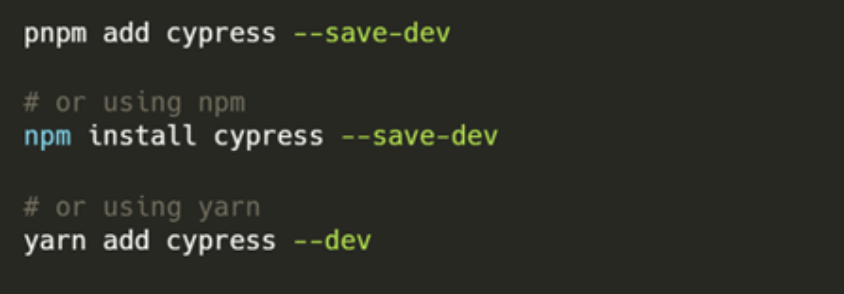
- Add scripts to `package.json` for running Cypress more easily.
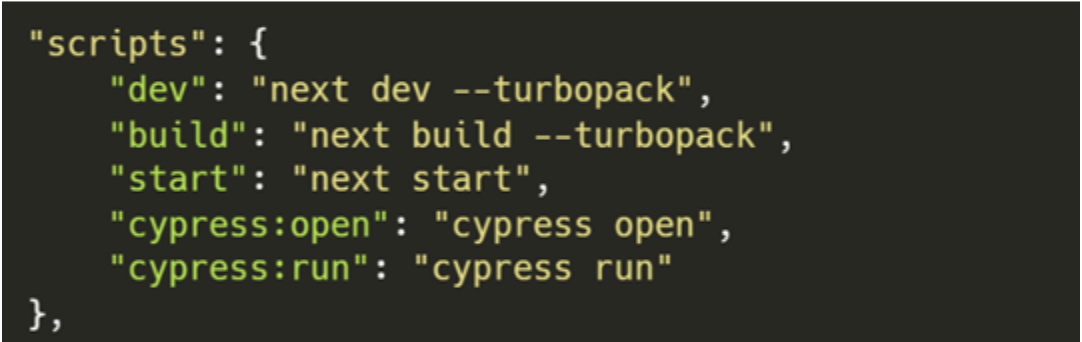
- Run Cypress to initialize it in the project.

b. Implementation
- Create a fixture: Store constant user data used in login tests
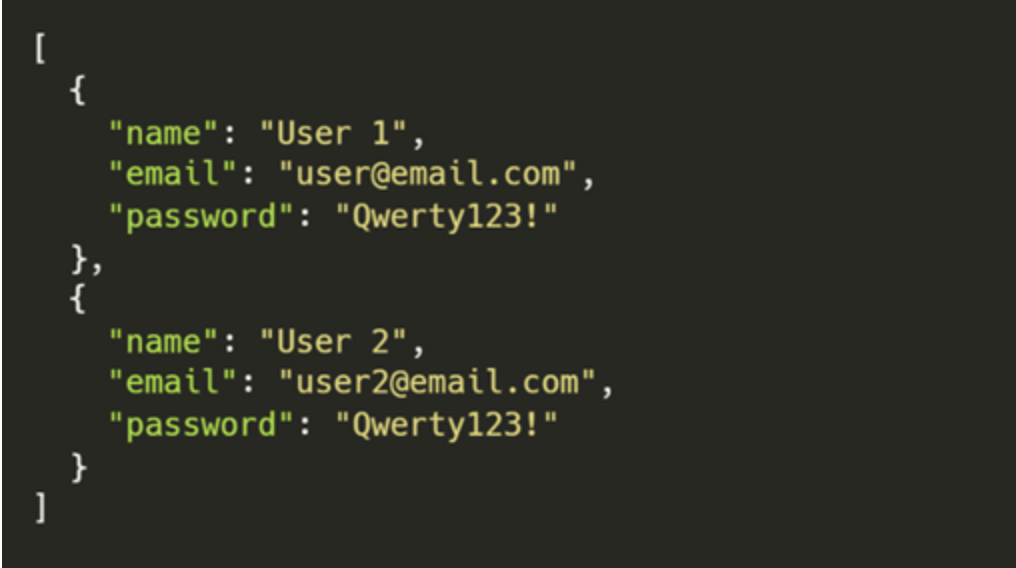
- Create a command file: Define reusable commands to reduce code duplication. Use “data-test” attributes as selectors for easy readable.
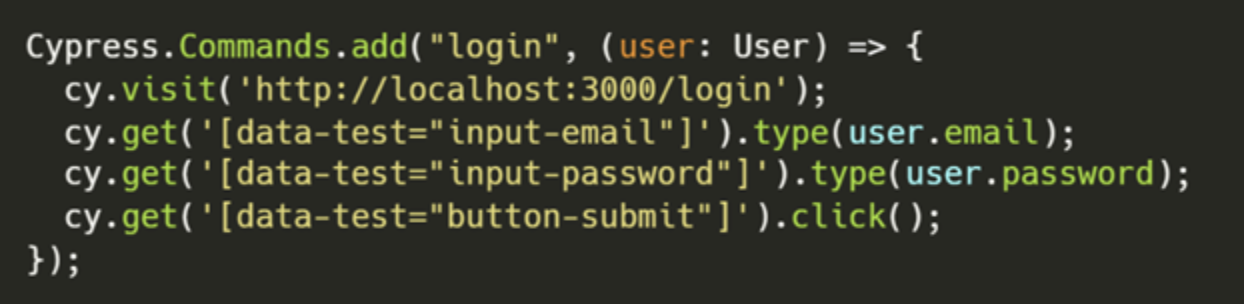
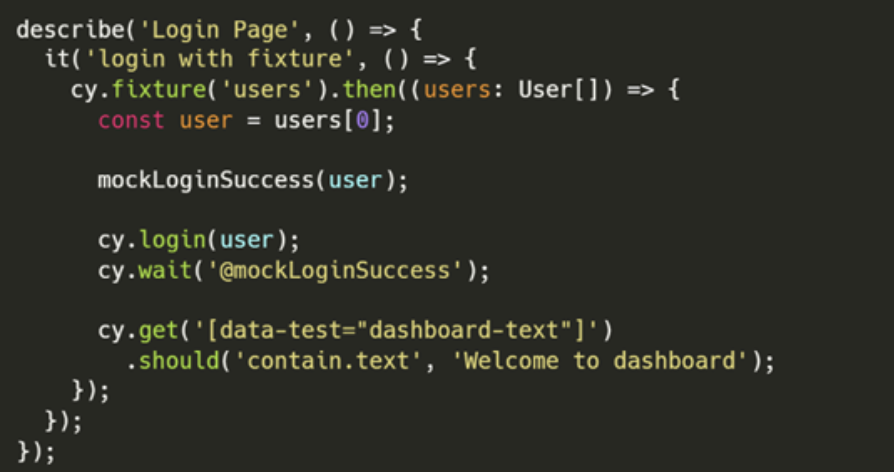
- Create test files: Define step-by-step tests. Use API mocks in pipelines for stability, and use real APIs locally/staging for realistic results.
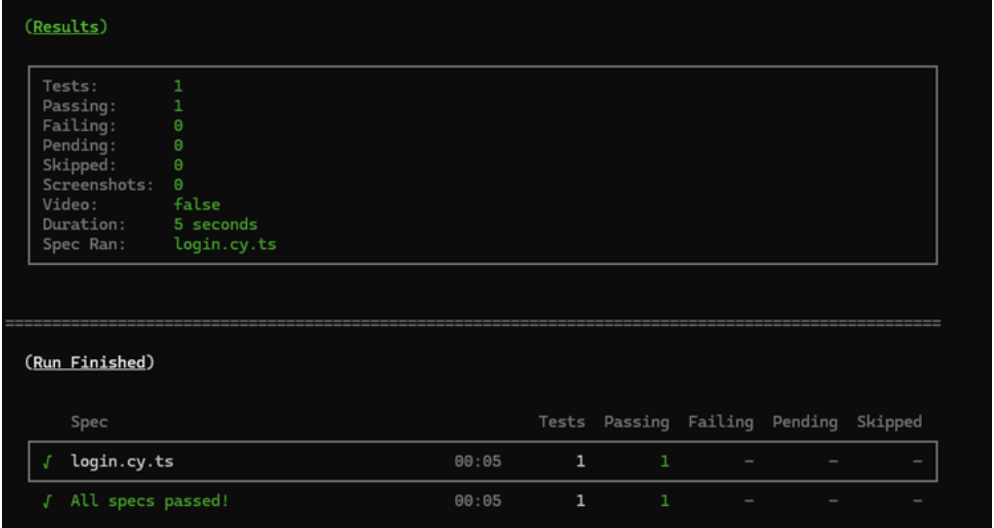
- Run test: You can run with `pnpm cypress:open` (GUI mode) or `pnpm cypress:run` (headless mode).
You can check my code on this github repository.
5. Is Cypress Really Effective and Efficient?
After integrating Cypress into my mini project, I want to share my experience to prove its pros and cons.
Pros
- Reliability
In reliability, Cypress can run consistently and reliably, but to create reliable and consistent tests, it’s essential to follow Cypress best practices, it’s not just about writing code that “works.” For example, using stable data-testid or data-selector attributes ensures Cypress can consistently locate rendered components. Additionally, using cy.intercept() to mock API responses helps produce predictable and repeatable test results.
- Early bug detection
When I integrated Cypress into the GitLab CI/CD pipeline, errors were detected easily. Whenever I pushed to a branch, the pipeline immediately indicated if any features were affected by the latest update. This helps me catch bugs before the features reach QA or PM. However, if the tests are not written following best practices, errors can become very disruptive to the pipeline process.
- Confidence in refactoring
To refactor cypress, it’s very easy. I tried to copy my Cypress setup from a Next.js project to a Nuxt 3 project, but it ran smoothly after configuring the data-selector and adding little adjustment on cypress config. As long as both projects use the same language (e.g., TypeScript), Cypress can be reused with minimal adjustments. However, moving from JavaScript to TypeScript may require minor refactoring, especially around data parsing and type definitions.
Cons
- Initial Setup Cost
Writing tests for new features can feel tedious because you need to set up fixtures, custom commands, intercepts, and test files. This process takes time and can feel like re-integrating the API with the web layer. To make this smoother, having clear test cases from QA specifically designed for automation is recommended. Although Cypress requires effort at the beginning, the long-term benefits clearly outweigh the initial setup time.
- Maintenance Overhead
When I applied best practices, I did not encounter significant or confusing maintenance issues, possibly because this was only done on a mini project rather than a large-scale project. However, in general, if best practices are properly followed, maintenance should not become a difficult problem.
- Learning Curve
As long as you understand the basics of JavaScript or TypeScript, learning Cypress is quite straightforward. Its syntax is user-friendly, and the official documentation is clear and well-structured. Compared to learning a new programming language from scratch, Cypress feels much easier to pick up.
6. Conclusion
Automation testing with Cypress has a significant impact on development teams, especially for large-scale front-end applications.
- Positive: Higher confidence, faster releases, reduced regression costs.
- Negative: Setup and maintenance require commitment.
- Impact: Accelerates SDLC, improves code quality, reduces production bugs.
Cypress provides a modern, fast, and efficient way to automate front-end testing. With features like time travel, visual debugging, and easy CI/CD integration, Cypress helps developers maintain high application quality.
7. Suggestion
From the practical implementation I conducted, there are several recommendations and potential areas of exploration that can help teams enhance their automation testing strategy using Cypress. These points aim to support both short-term improvements in test reliability and long-term research directions for QA, developers, PM, and project teams.
- Follow best practices when writing tests.
Use consistent structures and stable selectors, and avoid interdependent test cases. Additionally, explore component testing to perform isolated testing on individual components without running the entire application.
- Explore visual regression testing tools such as Percy, Applitools, or Happo.
These integrations help compare UI differences across builds, preventing unintended design changes when new features are added or existing components are modified.
- Create test documentation that is accessible across roles.
Present automation test results in a format that can be easily understood by Front-End Developers and Project Managers, allowing the findings to be quickly translated into actionable improvements.
- Research AI-assisted automation testing.
Learn how to build systems that automatically generate test cases from predefined documents or user flows. This approach can significantly accelerate integration and reduce the manual effort in writing automation tests.
- Allocate dedicated time and resources for the initial setup of automation tests.
Although the setup phase requires commitment, the investment pays off in the long run through faster, more consistent, and less error-prone regression testing.
- Continuously evaluate automation test results.
Don’t just checking pass/fail outcomes, but monitor how often pipelines fail due to flaky tests. Frequent instability indicates areas that may need refactoring or improved test reliability.
8. Reference
- https://trillionclues.medium.com/testing-next-js-applications-a-complete-guide-to-catching-bugs-before-qa-does-a1db8d1a0a3b
- https://nextjs.org/docs/13/pages/building-your-application/optimizing/testing
- https://www.cypress.io/blog/component-testing-next-js-with-cypress
- https://www.browserstack.com/guide/cypress-best-practices
- https://medium.com/@imrancodes/best-practices-for-testing-react-and-next-js-applications-in-2023-8b6bf09ba9e8